Virtual LANs (VLANs) are used to subdivide one local area network into several logically isolated broadcast domains, independent of physical topology. The LAN being subdivided into logical pieces can be any type of LAN -- including Ethernet or Wi-Fi.
Port-based VLANs rely on switch or AP configuration to enforce VLAN membership. For example, a switch can be configured to put ports 1 through 8 into VLAN #1 and ports 9 through 16 into VLAN #2. Every station in VLAN #1 will hear the same LAN broadcasts, but nobody in VLAN #2 will be able to do so. Similarly, a wireless AP can be configured to relay traffic to and from VLAN #1 onto a named network (SSID) while relaying traffic to and from VLAN #2 onto a different SSID. That technique is commonly used to segregate guest wireless traffic from other (private) wireless traffic on the wired network.
Alternatively, 802.1Q uses tags (VLAN IDs) carried inside LAN frames to segregate traffic and keep it separated. VLAN tags let 802.1Q-capable devices like switches, APs, routers, and firewalls enforce VLAN segregation along the packet's entire path.
As described above, a wireless AP can be configured to apply a specific VLAN tag to each frame from a particular SSID. Or, wireless APs can receive VLAN tag assignments for each station during 802.1X authentication, supplied by a RADIUS server using RFC 3580. This technique can put individual users into the right VLAN, based on authenticated identity instead of the SSID they connect to.
VLANs can be extended all the way across an enterprise network, from branch office, across the WAN, to headquarters. A VLAN tag does not traverse this entire route because VLANs only apply to local area networks. However, routers and firewalls along the way can be configured to map VLAN tags onto network sub-interfaces.
For example, traffic from VLAN #1 might be routed onto VPN tunnel A as it traverses the Internet, while traffic from VLAN #2 would be routed through VPN tunnel B, etc. Traffic through both VPN tunnels would probably be transmitted over the same WAN link in between locations. In other words, VPN tunnels can keep layer 3 traffic segregated over IP networks, just like VLANs keep layer 2 traffic segregated over LANs.
2009年11月12日 星期四

2009年11月10日 星期二
Media Access Control
The Media Access Control (MAC) data communication protocol sub-layer, also known as the Medium Access Control, is a sublayer of the Data Link Layer specified in the seven-layer OSI model (layer 2). It provides addressing and channel access control mechanisms that make it possible for several terminals or network nodes to communicate within a multipoint network, typically a local area network (LAN) or metropolitan area network (MAN). The hardware that implements the MAC is referred to as a Medium Access Controller.
The MAC sub-layer acts as an interface between the Logical Link Control (LLC) sublayer and the network's physical layer. The MAC layer emulates a full-duplex logical communication channel in a multipoint network. This channel may provide unicast, multicast or broadcast communication service.
Addressing mechanism
The MAC layer addressing mechanism is called physical address or MAC address. A MAC address is a unique serial number. Once a MAC address has been assigned to a particular piece of network hardware (at time of manufacture), that device should be uniquely identifiable amongst all other network devices in the world. This guarantees that each device in a network will have a different MAC address (analogous to a street address). This makes it possible for data packets to be delivered to a destination within a subnetwork, i.e. a physical network consisting of several network segments interconnected by repeaters, hubs, bridges and switches, but not by IP routers. An IP router may interconnect several subnets.
An example of a physical network is an Ethernet network, perhaps extended by wireless local area network (WLAN) access points and WLAN network adapters, since these share the same 48-bit MAC address hierarchy as Ethernet.
A MAC layer is not required in full-duplex point-to-point communication, but address fields are included in some point-to-point protocols for compatibility reasons.
Channel access control mechanism
The channel access control mechanisms provided by the MAC layer are also known as a multiple access protocol. This makes it possible for several stations connected to the same physical medium to share it. Examples of shared physical media are bus networks, ring networks, hub networks, wireless networks and half-duplex point-to-point links. The multiple access protocol may detect or avoid data packet collisions if a packet mode contention based channel access method is used, or reserve resources to establish a logical channel if a circuit switched or channelization based channel access method is used. The channel access control mechanism relies on a physical layer multiplex scheme.
The most widespread multiple access protocol is the contention based CSMA/CD protocol used in Ethernet networks. This mechanism is only utilized within a network collision domain, for example an Ethernet bus network or a hub network. An Ethernet network may be divided into several collision domains, interconnected by bridges and switches.
A multiple access protocol is not required in a switched full-duplex network, such as today's switched Ethernet networks, but is often available in the equipment for compatibility reasons.
The MAC sub-layer acts as an interface between the Logical Link Control (LLC) sublayer and the network's physical layer. The MAC layer emulates a full-duplex logical communication channel in a multipoint network. This channel may provide unicast, multicast or broadcast communication service.
Addressing mechanism
The MAC layer addressing mechanism is called physical address or MAC address. A MAC address is a unique serial number. Once a MAC address has been assigned to a particular piece of network hardware (at time of manufacture), that device should be uniquely identifiable amongst all other network devices in the world. This guarantees that each device in a network will have a different MAC address (analogous to a street address). This makes it possible for data packets to be delivered to a destination within a subnetwork, i.e. a physical network consisting of several network segments interconnected by repeaters, hubs, bridges and switches, but not by IP routers. An IP router may interconnect several subnets.
An example of a physical network is an Ethernet network, perhaps extended by wireless local area network (WLAN) access points and WLAN network adapters, since these share the same 48-bit MAC address hierarchy as Ethernet.
A MAC layer is not required in full-duplex point-to-point communication, but address fields are included in some point-to-point protocols for compatibility reasons.
Channel access control mechanism
The channel access control mechanisms provided by the MAC layer are also known as a multiple access protocol. This makes it possible for several stations connected to the same physical medium to share it. Examples of shared physical media are bus networks, ring networks, hub networks, wireless networks and half-duplex point-to-point links. The multiple access protocol may detect or avoid data packet collisions if a packet mode contention based channel access method is used, or reserve resources to establish a logical channel if a circuit switched or channelization based channel access method is used. The channel access control mechanism relies on a physical layer multiplex scheme.
The most widespread multiple access protocol is the contention based CSMA/CD protocol used in Ethernet networks. This mechanism is only utilized within a network collision domain, for example an Ethernet bus network or a hub network. An Ethernet network may be divided into several collision domains, interconnected by bridges and switches.
A multiple access protocol is not required in a switched full-duplex network, such as today's switched Ethernet networks, but is often available in the equipment for compatibility reasons.
Wireless ad hoc network
A wireless ad hoc network is a decentralized wireless network.[1] The network is ad hoc because it does not rely on a preexisting infrastructure, such as routers in wired networks or access points in managed (infrastructure) wireless networks. Instead, each node participates in routing by forwarding data for other nodes, and so the determination of which nodes forward data is made dynamically based on the network connectivity.
Application
The decentralized nature of wireless ad hoc networks makes them suitable for a variety of applications where central nodes can't be relied on, and may improve the scalability of wireless ad hoc networks compared to wireless managed networks, though theoretical and practical limits to the overall capacity of such networks have been identified.
Minimal configuration and quick deployment make ad hoc networks suitable for emergency situations like natural disasters or military conflicts. The presence of a dynamic and adaptive routing protocol will enable ad hoc networks to be formed quickly.
Medium Access Control
In most wireless ad hoc networks the nodes compete to access the shared wireless medium, often resulting in collisions. Using cooperative wireless communications improves immunity to interference by having the destination node combine self-interference and other-node interference to improve decoding of the desired signal.
Application
The decentralized nature of wireless ad hoc networks makes them suitable for a variety of applications where central nodes can't be relied on, and may improve the scalability of wireless ad hoc networks compared to wireless managed networks, though theoretical and practical limits to the overall capacity of such networks have been identified.
Minimal configuration and quick deployment make ad hoc networks suitable for emergency situations like natural disasters or military conflicts. The presence of a dynamic and adaptive routing protocol will enable ad hoc networks to be formed quickly.
Medium Access Control
In most wireless ad hoc networks the nodes compete to access the shared wireless medium, often resulting in collisions. Using cooperative wireless communications improves immunity to interference by having the destination node combine self-interference and other-node interference to improve decoding of the desired signal.
802.3 MAC Frame
A data packet on the wire is called a frame. A frame viewed on the actual physical wire would show Preamble and Start Frame Delimiter, in addition to the other data. These are required by all physical hardware.
The table below shows the complete Ethernet frame, as transmitted, for the MTU of 1500 bytes (some implementations of gigabit Ethernet and higher speeds support larger jumbo frames). Note that the bit patterns in the preamble and start of frame delimiter are written as bit strings, with the first bit transmitted on the left (not as byte values, which in Ethernet are transmitted least significant bit first). This notation matches the one used in the IEEE 802.3 standard. One octet is eight bits of data (i.e., a byte on most modern computers).
Wiki Frame format
The table below shows the complete Ethernet frame, as transmitted, for the MTU of 1500 bytes (some implementations of gigabit Ethernet and higher speeds support larger jumbo frames). Note that the bit patterns in the preamble and start of frame delimiter are written as bit strings, with the first bit transmitted on the left (not as byte values, which in Ethernet are transmitted least significant bit first). This notation matches the one used in the IEEE 802.3 standard. One octet is eight bits of data (i.e., a byte on most modern computers).
Wiki Frame format
2009年11月9日 星期一
Quality of service
In the field of computer networking and other packet-switched telecommunication networks, the traffic engineering term quality of service (QoS) refers to resource reservation control mechanisms rather than the achieved service quality. Quality of service is the ability to provide different priority to different applications, users, or data flows, or to guarantee a certain level of performance to a data flow.
For example, a required bit rate, delay, jitter, packet dropping probability and/or bit error rate may be guaranteed. Quality of service guarantees are important if the network capacity is insufficient, especially for real-time streaming multimedia applications such as voice over IP, online games and IP-TV, since these often require fixed bit rate and are delay sensitive, and in networks where the capacity is a limited resource, for example in cellular data communication. In the absence of network congestion, QoS mechanisms are not required.
A network or protocol that supports QoS may agree on a traffic contract with the application software and reserve capacity in the network nodes, for example during a session establishment phase. During the session it may monitor the achieved level of performance, for example the data rate and delay, and dynamically control scheduling priorities in the network nodes. It may release the reserved capacity during a tear down phase.
For example, a required bit rate, delay, jitter, packet dropping probability and/or bit error rate may be guaranteed. Quality of service guarantees are important if the network capacity is insufficient, especially for real-time streaming multimedia applications such as voice over IP, online games and IP-TV, since these often require fixed bit rate and are delay sensitive, and in networks where the capacity is a limited resource, for example in cellular data communication. In the absence of network congestion, QoS mechanisms are not required.
A network or protocol that supports QoS may agree on a traffic contract with the application software and reserve capacity in the network nodes, for example during a session establishment phase. During the session it may monitor the achieved level of performance, for example the data rate and delay, and dynamically control scheduling priorities in the network nodes. It may release the reserved capacity during a tear down phase.
Dealing with multiple clients
CSMA/CD shared medium Ethernet
Ethernet originally used a shared coaxial cable (the shared medium) winding around a building or campus to every attached machine. A scheme known as carrier sense multiple access with collision detection (CSMA/CD) governed the way the computers shared the channel. This scheme was simpler than the competing token ring or token bus technologies. When a computer wanted to send some information, it used the following algorithm:
Main procedure
1.Frame ready for transmission.
2.Is medium idle? If not, wait until it becomes ready and wait the interframe gap period (9.6 µs in 10 Mbit/s Ethernet).
3.Start transmitting.
4.Did a collision occur? If so, go to collision detected procedure.
5.Reset retransmission counters and end frame transmission.
Collision detected procedure
1.Continue transmission until minimum packet time is reached (jam signal) to ensure that all receivers detect the collision.
2.Increment retransmission counter.
3.Was the maximum number of transmission attempts reached? If so, abort transmission.
4.Calculate and wait random backoff period based on number of collision
5.Re-enter main procedure at stage 1.
This can be likened to what happens at a dinner party, where all the guests talk to each other through a common medium (the air). Before speaking, each guest politely waits for the current speaker to finish. If two guests start speaking at the same time, both stop and wait for short, random periods of time (in Ethernet, this time is generally measured in microseconds). The hope is that by each choosing a random period of time, both guests will not choose the same time to try to speak again, thus avoiding another collision. Exponentially increasing back-off times (determined using the truncated binary exponential backoff algorithm) are used when there is more than one failed attempt to transmit.
Ethernet originally used a shared coaxial cable (the shared medium) winding around a building or campus to every attached machine. A scheme known as carrier sense multiple access with collision detection (CSMA/CD) governed the way the computers shared the channel. This scheme was simpler than the competing token ring or token bus technologies. When a computer wanted to send some information, it used the following algorithm:
Main procedure
1.Frame ready for transmission.
2.Is medium idle? If not, wait until it becomes ready and wait the interframe gap period (9.6 µs in 10 Mbit/s Ethernet).
3.Start transmitting.
4.Did a collision occur? If so, go to collision detected procedure.
5.Reset retransmission counters and end frame transmission.
Collision detected procedure
1.Continue transmission until minimum packet time is reached (jam signal) to ensure that all receivers detect the collision.
2.Increment retransmission counter.
3.Was the maximum number of transmission attempts reached? If so, abort transmission.
4.Calculate and wait random backoff period based on number of collision
5.Re-enter main procedure at stage 1.
This can be likened to what happens at a dinner party, where all the guests talk to each other through a common medium (the air). Before speaking, each guest politely waits for the current speaker to finish. If two guests start speaking at the same time, both stop and wait for short, random periods of time (in Ethernet, this time is generally measured in microseconds). The hope is that by each choosing a random period of time, both guests will not choose the same time to try to speak again, thus avoiding another collision. Exponentially increasing back-off times (determined using the truncated binary exponential backoff algorithm) are used when there is more than one failed attempt to transmit.
Truncated binary exponential backoff
In a variety of computer networks, binary exponential backoff or truncated binary exponential backoff refers to an algorithm used to space out repeated retransmissions of the same block of data.
Examples are the retransmission of frames in carrier sense multiple access with collision avoidance (CSMA/CA) and carrier sense multiple access with collision detection (CSMA/CD) networks, where this algorithm is part of the channel access method used to send data on these network. In Ethernet networks, the algorithm is commonly used to schedule retransmissions after collisions. The retransmission is delayed by an amount of time derived from the slot time and the number of attempts to retransmit.
After i collisions, a random number of slot times between 0 and 2i − 1 is chosen. For the first collision, each sender might wait 0 or 1 slot times. After the second collision, the senders might wait 0, 1, 2, or 3 slot times, and so forth. As the number of retransmission attempts increases, the number of possibilities for delay increases.
The 'truncated' simply means that after a certain number of increases, the exponentiation stops; i.e. the retransmission timeout reaches a ceiling, and thereafter does not increase any further. For example, if the ceiling is set at i=10, then the maximum delay is 1023 slot times.
Because these delays cause other stations who are sending to collide as well, there is a possibility that, on a busy network, hundreds of people may be caught in a single collision set. Because of this possibility, after 16 attempts at transmission, the process is aborted.
Examples are the retransmission of frames in carrier sense multiple access with collision avoidance (CSMA/CA) and carrier sense multiple access with collision detection (CSMA/CD) networks, where this algorithm is part of the channel access method used to send data on these network. In Ethernet networks, the algorithm is commonly used to schedule retransmissions after collisions. The retransmission is delayed by an amount of time derived from the slot time and the number of attempts to retransmit.
After i collisions, a random number of slot times between 0 and 2i − 1 is chosen. For the first collision, each sender might wait 0 or 1 slot times. After the second collision, the senders might wait 0, 1, 2, or 3 slot times, and so forth. As the number of retransmission attempts increases, the number of possibilities for delay increases.
The 'truncated' simply means that after a certain number of increases, the exponentiation stops; i.e. the retransmission timeout reaches a ceiling, and thereafter does not increase any further. For example, if the ceiling is set at i=10, then the maximum delay is 1023 slot times.
Because these delays cause other stations who are sending to collide as well, there is a possibility that, on a busy network, hundreds of people may be caught in a single collision set. Because of this possibility, after 16 attempts at transmission, the process is aborted.
Ethernet hub
Hubs classify as Layer 1 devices in the OSI model. At the physical layer, hubs can support little in the way of sophisticated networking. Hubs do not read any of the data passing through them and are not aware of their source or destination. Essentially, a hub simply receives incoming packets, possibly amplifies the electrical signal, and broadcasts these packets out to all devices on the network - including the one that originally sent the packet.
Reference:
Wiki
Reference:
Wiki
802.3/Ethernet
Reference:
http://www.dcs.gla.ac.uk/~lewis/networkpages/m04s03EthernetFrame.htm
To send a frame, a station on an 802.3 network first listens to the Ether (carrier sense function). If the Ether is busy, the station defers, but, after the current activity stops, it uses a 1-persistent strategy and will wait only for a short, fixed delay, the inter-frame gap, before beginning to transmit. If there is no collision, the transmission will complete successfully. If, however, a collision is detected, the frame transmission stops and the station begins to send a jamming signal�to make sure that all other stations realise what has happened. The station then backs off for a random time interval before trying again. The back-off�interval is computed using an algorithm called truncated binary exponential backoff, which works as follows.
The station always waits for some multiple of a 51.2ms time interval, known as a slot. The station chooses a number randomly from the set {0,1} and waits for that number of slots. If there is another collision it waits again, but this time for a number chosen from {0,1,2,3}. After k collisions on the same transmission it chooses its number randomly from {0, �, 2k-1}, until k = 10, when the set is frozen. After k = 16, the so-called attempt limit, the MAC unit gives up and reports a failure to the layer above.
http://www.dcs.gla.ac.uk/~lewis/networkpages/m04s03EthernetFrame.htm
To send a frame, a station on an 802.3 network first listens to the Ether (carrier sense function). If the Ether is busy, the station defers, but, after the current activity stops, it uses a 1-persistent strategy and will wait only for a short, fixed delay, the inter-frame gap, before beginning to transmit. If there is no collision, the transmission will complete successfully. If, however, a collision is detected, the frame transmission stops and the station begins to send a jamming signal�to make sure that all other stations realise what has happened. The station then backs off for a random time interval before trying again. The back-off�interval is computed using an algorithm called truncated binary exponential backoff, which works as follows.
The station always waits for some multiple of a 51.2ms time interval, known as a slot. The station chooses a number randomly from the set {0,1} and waits for that number of slots. If there is another collision it waits again, but this time for a number chosen from {0,1,2,3}. After k collisions on the same transmission it chooses its number randomly from {0, �, 2k-1}, until k = 10, when the set is frozen. After k = 16, the so-called attempt limit, the MAC unit gives up and reports a failure to the layer above.
2009年11月8日 星期日
Hidden and Exposed Station Problems
We referred to hidden and exposed station problems in the previous section. It is time now to dicuss these problems and their effects.
Hidden Station Problem
Figure 14.10 shows an example of the hidden station problem.

Station B has a transmission range shown by the left oval (sphere in space);
every station in this range can hear any signal transmitted by station B. Station C has a transmission range shown by the right oval (sphere in space); every station located in this range can hear any signal transmitted by C. Station C is outside the transmission range of B; likewise, station B is outside the transmission range of C. Station A,however, is in the area covered by both B and C; it can hear any signal transmitted by B or C.
Assume that station B is sending data to station A. In the middle of this transmission,station C also has data to send to station A. However, station C is out of B’s range and transmissions from B cannot reach C. Therefore C thinks the medium is free.
Hidden Station Problem
Figure 14.10 shows an example of the hidden station problem.
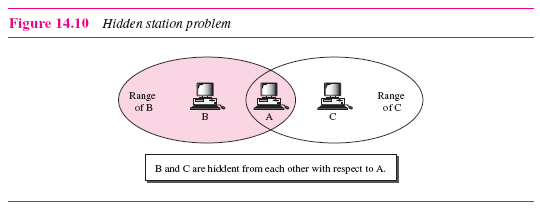
Station B has a transmission range shown by the left oval (sphere in space);
every station in this range can hear any signal transmitted by station B. Station C has a transmission range shown by the right oval (sphere in space); every station located in this range can hear any signal transmitted by C. Station C is outside the transmission range of B; likewise, station B is outside the transmission range of C. Station A,however, is in the area covered by both B and C; it can hear any signal transmitted by B or C.
Assume that station B is sending data to station A. In the middle of this transmission,station C also has data to send to station A. However, station C is out of B’s range and transmissions from B cannot reach C. Therefore C thinks the medium is free.
why does CSMA/CD LAN impose both a minimum and a maximum size frame limit?
The 64 byte (Ethernet) minimum limit is based on the fact that - if you follow the standards for cable lengths and number of hops in the Ethernet segment - one node may not "hear" the transmission of another node until the transmitting node has transmitted the 64th byte of data (if the two nodes are far apart from each other, it will take that long for the signal to propogate down the wire(s)).
In CSMA/CD, the transmitting node is listening for collisions while it transmits it's frame. Once it's finished transmitting the final bit without hearing a collision, it presumes the transmission was successful.
If one node were to transmit a very small frame, it could finish the transmission before a remote node heard the first bits. If the remote node starts to transmit it's own frame (because it hasn't heard the transmission of the first node yet), then there will be a collision, but the first node will no longer be listening for collisions because it finished it's transmission.
In Ethernet, we presume that by the time one node has finished transmitting the 64th byte, that all other nodes will have heard the transmission and will wait before trying to transmit their own data., So we don't normally expect collisions to occur after the 64th byte.
As a matter of fact, if you look at a switch and see counters for "collisions" and "late collisions" - the late collissions are collisions that occurred after the 64th byte was transmitted. Usually the only time where you'd expect to see late collisions is when the network is not cabled properly (cable distances are too long or too many hops), or if there's a duplex mismatch between two devices (one is half duplex - listening to the media before transmitting; and the other is full duplex - transmitting it's data at any time).
As for the maximum frame size, I'm not 100% sure, but I believe it was designed to keep any node from monopolizing the network for too long of a period. If a node has to stop transmitting after 1518 bytes (presuming Ethernet), then it gives other nodes a chance to transmit their data. Another consideration on some technologies is that nodes synchronize their send/receive clocks using the flags (aka prefix, starting delimiter, preamble) that are sent at the beginning and sometimes end of each frame. By keeping the frame size relatively small, these synchronization bits are sent/received more often and will help to keep the nodes' clocks synchronized.
I do know that there are Ethernet switches and NICs that support frames larger than 1518 bytes ("jumbo frames") - if you enable them to do so.
In CSMA/CD, the transmitting node is listening for collisions while it transmits it's frame. Once it's finished transmitting the final bit without hearing a collision, it presumes the transmission was successful.
If one node were to transmit a very small frame, it could finish the transmission before a remote node heard the first bits. If the remote node starts to transmit it's own frame (because it hasn't heard the transmission of the first node yet), then there will be a collision, but the first node will no longer be listening for collisions because it finished it's transmission.
In Ethernet, we presume that by the time one node has finished transmitting the 64th byte, that all other nodes will have heard the transmission and will wait before trying to transmit their own data., So we don't normally expect collisions to occur after the 64th byte.
As a matter of fact, if you look at a switch and see counters for "collisions" and "late collisions" - the late collissions are collisions that occurred after the 64th byte was transmitted. Usually the only time where you'd expect to see late collisions is when the network is not cabled properly (cable distances are too long or too many hops), or if there's a duplex mismatch between two devices (one is half duplex - listening to the media before transmitting; and the other is full duplex - transmitting it's data at any time).
As for the maximum frame size, I'm not 100% sure, but I believe it was designed to keep any node from monopolizing the network for too long of a period. If a node has to stop transmitting after 1518 bytes (presuming Ethernet), then it gives other nodes a chance to transmit their data. Another consideration on some technologies is that nodes synchronize their send/receive clocks using the flags (aka prefix, starting delimiter, preamble) that are sent at the beginning and sometimes end of each frame. By keeping the frame size relatively small, these synchronization bits are sent/received more often and will help to keep the nodes' clocks synchronized.
I do know that there are Ethernet switches and NICs that support frames larger than 1518 bytes ("jumbo frames") - if you enable them to do so.
2009年11月1日 星期日
Getting to be a professional of internet marketer
Have you ever thought of preparing yourself to master the internet traffic? Google provides opportunity for users to engage in examination to be a professional internet marketer. The Google Advertising Professional Examination tests you about the knowledge of AdWords, which lets you create simple, effective ads and display them to people already searching online for information related to your business.
There are online learning center providing a thorough and educational material for users to study before the examination. Click here to access it. AdWords Learning Center
The exam is taken by home-based, so you can apply it for any time, any place you are available.
To enter the exam, you have to really spend about at least 2 weeks to study. But also, you have to apply for the client account to demonstrate your skills on attracting a client base for a particular business. However, the account should be maintained within 90 days. And, you have to pay US$1000 each month for the minimum-price per click to Google. The examination fee is $50 each trail with 104 questions given 1 and a half hour. So, altogether the examination costs you US$3000 + US$50 each trial.
Although it seems too expensive for a unversity student, it does benefit your future career. Let see how other people comment on the examination.
1. http://blog.clickfire.com/passed-google-advertising-professional-exam/
2. http://www.seochat.com/c/a/Search-Engine-News/Google-Advertising-Professional-How-I-Did-It-and-Is-It-Worth-It/
There are online learning center providing a thorough and educational material for users to study before the examination. Click here to access it. AdWords Learning Center
The exam is taken by home-based, so you can apply it for any time, any place you are available.
To enter the exam, you have to really spend about at least 2 weeks to study. But also, you have to apply for the client account to demonstrate your skills on attracting a client base for a particular business. However, the account should be maintained within 90 days. And, you have to pay US$1000 each month for the minimum-price per click to Google. The examination fee is $50 each trail with 104 questions given 1 and a half hour. So, altogether the examination costs you US$3000 + US$50 each trial.
Although it seems too expensive for a unversity student, it does benefit your future career. Let see how other people comment on the examination.
1. http://blog.clickfire.com/passed-google-advertising-professional-exam/
2. http://www.seochat.com/c/a/Search-Engine-News/Google-Advertising-Professional-How-I-Did-It-and-Is-It-Worth-It/
2009年10月31日 星期六
How Google Search Works
Google is the world’s most popular search engine. More than 60% of Internet users around the world use Google to search for information, products, or services. Google’s popularity stems from its minimalist design and the relevancy of its search results.
When a user visits Google.com, he enters a keyword and presses the Google Search button (this is called a search query). In response, Google displays a search results page, which lists web pages relating to the search query. The most relevant page appears first, followed by the second most relevant page, and so on.
How does Google know which results are most relevant? The answer lies in Google’s algorithms, which are a set of advanced calculations that help identify the relevancy of results to each search query. Google crawls the web regularly, indexing billions of web pages – similar to the way a library card catalog indexes books. When a user enters a search term, Google scans its vast index and displays the most relevant pages based on PageRank™ and other advanced algorithms.
PageRank™ relies on the link structure of the web as an indicator of an individual page’s value. In essence, Google interprets a link from page A to page B as a vote, by page A, for page B. But Google looks at more than the sheer volume of links a page receives; it also analyzes the page that hosts the link. Votes cast by pages that are themselves “important” weigh more heavily and help to make other pages “important".

2009年10月8日 星期四
Technique to SEO
I would like to share some technique if you want to increase the popularity of your website. It actually contains some many tasks besides declaration of HTML. Now, I am not gonna to explain the basic technique but rather the more advanced one.
Web Server location
I suggest you to host a web in a server location where matches your website's information and language. This is, if you aims at mainly doing the service for Hong Kong users, then you 'd better have your hosting server in Hong Kong. The reason is, when a Hong Kong user searches some related products on Google, the Google will automatically ignore all the other webs from other countries. This is Google will just show Hong Kong server-sided website as preference. Google can always check your IP address to determine everything. Here, I suggest a GeoIP website to you guys.
http://www.maxmind.com/app/ip-locate
How does GeoIP work? The idea behind GeoIP is simple but the process is complex. We employ user-entered location data from sites that ask web visitors to provide their geographic location. We then run millions of these datasets through a series of algorithms that identify, extract, and extrapolate location points for IP addresses.
Check the ranking of your website regularly
Page Rank Checker is a free tool to check Google™ page ranking of any web site pages easily and to display your site's PageRank™ value on your web pages. For more information, please click and have a simple experience.
http://www.prchecker.info/index.php
Reaching the keywords for your website
Before declaring your website online, you have to know well about the keywords that your users intend to type on search engine. Giving the website of yahoo, you would probably know more.
http://tw.emarketing.yahoo.com/ysm/guide/index101.html
Or you adopt the one from Google, but its analytical power is much weaker than the one from Yahoo.
https://adwords.google.com/select/KeywordToolExternal
Web Server location
I suggest you to host a web in a server location where matches your website's information and language. This is, if you aims at mainly doing the service for Hong Kong users, then you 'd better have your hosting server in Hong Kong. The reason is, when a Hong Kong user searches some related products on Google, the Google will automatically ignore all the other webs from other countries. This is Google will just show Hong Kong server-sided website as preference. Google can always check your IP address to determine everything. Here, I suggest a GeoIP website to you guys.
http://www.maxmind.com/app/ip-locate
How does GeoIP work? The idea behind GeoIP is simple but the process is complex. We employ user-entered location data from sites that ask web visitors to provide their geographic location. We then run millions of these datasets through a series of algorithms that identify, extract, and extrapolate location points for IP addresses.
Check the ranking of your website regularly
Page Rank Checker is a free tool to check Google™ page ranking of any web site pages easily and to display your site's PageRank™ value on your web pages. For more information, please click and have a simple experience.
http://www.prchecker.info/index.php
Reaching the keywords for your website
Before declaring your website online, you have to know well about the keywords that your users intend to type on search engine. Giving the website of yahoo, you would probably know more.
http://tw.emarketing.yahoo.com/ysm/guide/index101.html
Or you adopt the one from Google, but its analytical power is much weaker than the one from Yahoo.
https://adwords.google.com/select/KeywordToolExternal
2009年10月6日 星期二
Let's apply SEO to your blog
SEO triggers Personal Interest
Living in the 21st century, media and information is exploding with different product/service companies extraordinarily tensely compete with each other. We, as a university student, sooner or later enter the working force. We should be the one who lead the information technology but not as the one being overwhelmed by information technology. So, SEO (search engine optimization) is a key progress to stand out your creative idea. Getting more prone to SEO not only increases your competitiveness of the website (if it is promoting particular product/service) and get people easily located to the useful realm of information, but to me, it is a way to earn a considerable amount of money by helping your future client get rid of other competitors.
Recently, I have searched tons of websites on internet talking about SEO technology. More specifically, News about a Hong Kong IT expertise making a website for a France-subsidized company earning over 1 million incomes incredibly surprises me. To some extent, such a good News will drive my interest on SEO exploration for the rest of my life.
SEO
SEO is to prioritize your web site to be always the top by utilizing the full advantages of nowadays popular search engine. In Hong Kong market, Yahoo, google, Baidu, MSN are the most famous search engine. They provide free charge on promotion of website.
apply SEO to your blog
You may say it is none of my business since I am never interested in working for a IT companies. But does it really not a matter? I don’t think. Have you ever being frustrated by your personal blog containing too many personal views but hopelessly with few visitors? Strictly speaking, I have such a painful experience. For some days, I have ever thought of shutting the blog down. But after that, I ask myself, is it really the contents that I write boring that makes my blog unpopular? It may be because of the fact that I have never optimized the contents. In this case, SEO helps a lot.
http://www.fjsky.cn/html/blog/20090121/1269.html
I suggest people experiencing the same situation read the above though it is written in Chinese. Out of the points, I would appreciate the writer suggests to make a controversial topic that attracts comments. One example will be on Hong Kong Xanga blog titled 《痛斥虛偽耶教徒》.
《痛斥虛偽耶教徒》
I am sure it will continue to arouse social discussion as such a topic is endless to reach a consensus among public. So, starting from now, let’s devote yourself to the SEO promotion.
Living in the 21st century, media and information is exploding with different product/service companies extraordinarily tensely compete with each other. We, as a university student, sooner or later enter the working force. We should be the one who lead the information technology but not as the one being overwhelmed by information technology. So, SEO (search engine optimization) is a key progress to stand out your creative idea. Getting more prone to SEO not only increases your competitiveness of the website (if it is promoting particular product/service) and get people easily located to the useful realm of information, but to me, it is a way to earn a considerable amount of money by helping your future client get rid of other competitors.
Recently, I have searched tons of websites on internet talking about SEO technology. More specifically, News about a Hong Kong IT expertise making a website for a France-subsidized company earning over 1 million incomes incredibly surprises me. To some extent, such a good News will drive my interest on SEO exploration for the rest of my life.
SEO
SEO is to prioritize your web site to be always the top by utilizing the full advantages of nowadays popular search engine. In Hong Kong market, Yahoo, google, Baidu, MSN are the most famous search engine. They provide free charge on promotion of website.
apply SEO to your blog
You may say it is none of my business since I am never interested in working for a IT companies. But does it really not a matter? I don’t think. Have you ever being frustrated by your personal blog containing too many personal views but hopelessly with few visitors? Strictly speaking, I have such a painful experience. For some days, I have ever thought of shutting the blog down. But after that, I ask myself, is it really the contents that I write boring that makes my blog unpopular? It may be because of the fact that I have never optimized the contents. In this case, SEO helps a lot.
http://www.fjsky.cn/html/blog/20090121/1269.html
I suggest people experiencing the same situation read the above though it is written in Chinese. Out of the points, I would appreciate the writer suggests to make a controversial topic that attracts comments. One example will be on Hong Kong Xanga blog titled 《痛斥虛偽耶教徒》.
《痛斥虛偽耶教徒》
I am sure it will continue to arouse social discussion as such a topic is endless to reach a consensus among public. So, starting from now, let’s devote yourself to the SEO promotion.
2009年9月24日 星期四
40 creative blog footer designs
When we design a website, we usually miss a very little part - the footer where a place for copyright notices and credit links. But after making reference to some of the design on the following, it actually astonishes me a lot. As you might be able to see, you can make good use of this traditionally underused part to some many other purposes. Here, I would suggest twitter updats, sharing to popular website like Facebook, Delicious, popular posts, recent comments, etc. you could also make the event more appealing and eye-catching by placing animated gif or static vector graphics like these examples.


reference:
2009年9月17日 星期四
about the information architecture
After reading material about the information architecture, I think I gain its basic concept. I am trying to explain my understanding in this way. It is just like the way you take the MTR and attempt to find exit. The process of reaching your destination will be the job of information architecture. It is not taken for granted or by luck that you could find your route subsequently. But rather it is because of your past experience (ie. walk according to the instruction indicator)that directs you to the MTR exit. All in all, this past experience is so-called usability - the ability for users to figure out some information by common sense. And information architecture is how you present the exit indicator into the most readable way that leads the passengers to their way. I hope this example can somehow give you an idea of what information arhitecture is.
2009年9月14日 星期一
Table good or bad?
Recently, I have searched a lot of information and getting some idea of the disadvantages of using Table in HTML.Then, I summarize them into the following view points.
1. They result in load times that are longer than necessary.
2. They encourage the use of inefficient “placeholder graphics” that further slow performance.
3. Their maintenance can be a difficult.
4. Inaccessible to the partially disable person when coding table by screen reader.
Tables Mean Long Load Times
When designers began to rely on tables to contain all or most of the content of a Web page, they were also saddled with the consequences of this design decision. In addition to the apparent delay that many users experience as a result of tables displaying all at once, the sheer volume of HTML code that’s required to create Web page layouts with nested tables can also add load time due to the increased page size. Table-based layouts almost certainly account for more user concern over long page-load times than any other single factor. Avoiding this significant load time would obviously be A Good Thing.
Use of Transparent Images Slows us Down
Even when using tables as layout mechanisms, designers could not quite attain the detailed level of control they wanted over page design. Sometimes, for instance, a designer might need a bit more breathing room around one part of a table cell—something for which tables do not allow. This kind of precision was unachievable.
Early on, someone came up with the notion of creating a transparent.gif image file—a tiny GIF image that had no visible content. By creating table cells that contained these transparent images, we could force extra vertical and horizontal “space” into tables whose cells were designed to remain in close proximity to one another.
The problem is that, given a table with dozens (or even hundreds) of these images, and depending on a variety of other factors, the performance impact of transparent GIFs on a Web page can be significant. More importantly, though, this technique often restricts the page to a fixed pixel size, and clutters the page with images that are irrelevant to the meaning of the page content.
Tables Cause Accessibility Issues
The fourth reason why tables are bad lies in the way non-graphical browsers—such as the screen readers used by many visually impaired users—read an HTML document. When a text-only device reads the content of a site, it starts at the top and works down the page line by line. When it comes to a table, it starts at the first (top-left) cell, then continues along the top row, then moves to the second row, and so on. In the case of a table that’s used correctly, for tabular data, this is rarely a problem. However, where nested tables have been used to display chunks of text in the desired layout, that content can become nonsensical when read in this manner.
When it’s Okay to Use a Table
There’s one notable exception to the cardinal rule that Tables Are A Bad Thing. If you have tabular data, and the appearance of that data is less important than its appropriate display in connection with other portions of the same data set, then a table is in order. If you have information that would best be displayed in a spreadsheet such as Excel, you have tabular data.
In general (though, undoubtedly, there are exceptions to this rule as well), this means that the use of tables should be confined to the presentation of numeric or textual data, not graphics, multimedia data types, forms, or any other interactive user interface components.
2009年9月8日 星期二
User Experience
Recently, I am searching about the facebook api and visit a word "User Experience" most frequently. Then I immediately bump into Wiki and get some idea of its meaning. With the fastening changing telecommunciation pace, the whole IT industry are becoming to concern user's perception of their device/system. This concern is directed at affecting all aspects of the users' interaction with the product - how it is perceived, learned and used.
In the web world, user experience is sometimes conflated with usability, information architecture (IA), and user interface (UI) design, all of which are components of it. User experience addresses and integrates all user-facing aspects of a company, from email and web sites to off-site presence in print and on other sites.
The User Experience is a highly multi-disciplinary field, incorporating aspects of
psychology, anthropology, computer science, graphic design, industrial design and cognitive science.
Knowing well about the User Experience, we should create the following deliverables later on including the following:
Site Audit (usability study of existing assets)
Flows and Navigation Maps
User stories or Scenarios
Persona (Fictitious users to act out the scenarios)
Site Maps and Content Inventory
Wireframes (screen blueprints or storyboards)
Prototypes (For interactive or in-the-mind simulation)
Written specifications (describing the behavior or design)
Graphic mockups (Precise visual of the expected end result)
In the web world, user experience is sometimes conflated with usability, information architecture (IA), and user interface (UI) design, all of which are components of it. User experience addresses and integrates all user-facing aspects of a company, from email and web sites to off-site presence in print and on other sites.
The User Experience is a highly multi-disciplinary field, incorporating aspects of
psychology, anthropology, computer science, graphic design, industrial design and cognitive science.
Knowing well about the User Experience, we should create the following deliverables later on including the following:
Site Audit (usability study of existing assets)
Flows and Navigation Maps
User stories or Scenarios
Persona (Fictitious users to act out the scenarios)
Site Maps and Content Inventory
Wireframes (screen blueprints or storyboards)
Prototypes (For interactive or in-the-mind simulation)
Written specifications (describing the behavior or design)
Graphic mockups (Precise visual of the expected end result)
Knowledge sharing about Computer Network
I would like to record my learning pace from the Computer Network Course here too. Learning should be based on interest. And I would like to develop my study interest through a series of doing after-class reflection. Computer network should have connection with the Web design and engineering at some point. And that is why I chooese to write something related out of the syllabus.
Now, I understand the key difference between a LAN and a WAN. A LAN (local area network) is a group of computers and network devices connected together, usually within the same building
A WAN (wide area network), is not restricted to a geographical location. A WAN connects several LANs, and may be limited to an enterprise (a corporation or an organization) or accessible to the public. The technology is high speed and relatively cost-expensive.
The reason for the LANS to base on broadcast but not WANs do so is their nature difference that accounts. For LANs, it only connects to one central point which requires to receive data only. But for WANs, the whole network requires not only data receive but also the sending action. This question actually leads to the second question.
Voice transmission are real-time but data transmission are error-free. The technology are specialized in separate network due to the nature difference. As what has mentioned previously, the nature difference tells us that we should utilize resource to its full dimension since data request from the access point is limited with the increasing demands.
Now, I understand the key difference between a LAN and a WAN. A LAN (local area network) is a group of computers and network devices connected together, usually within the same building
A WAN (wide area network), is not restricted to a geographical location. A WAN connects several LANs, and may be limited to an enterprise (a corporation or an organization) or accessible to the public. The technology is high speed and relatively cost-expensive.
The reason for the LANS to base on broadcast but not WANs do so is their nature difference that accounts. For LANs, it only connects to one central point which requires to receive data only. But for WANs, the whole network requires not only data receive but also the sending action. This question actually leads to the second question.
Voice transmission are real-time but data transmission are error-free. The technology are specialized in separate network due to the nature difference. As what has mentioned previously, the nature difference tells us that we should utilize resource to its full dimension since data request from the access point is limited with the increasing demands.
2009年9月7日 星期一
Review of the first tutorial
I have undergone an one-hour tutorial yesterday noon. The question asked meanwhile was whether it is a good idea to format HTML by using frame. It is no sense to say yes as everyone knows the reason.
First, the format of frame may not be supported by every single browser and leads to information hiden in some website.
Second, using frame could downgrade the capability of search engine. In other words, the search engine may sometimes search the subframe rather than an entire of the web site.
Third, using frame is hard to control CSS style, which is the core of the website's layout, thus no good for future maintainance.
Fourth, our current location may be confused by the frame function when we have had been performing page-backward/forward at the sub-frame level because a subframe itself could produce several subframe contents like the parent and child contents together, which is not supposed to appear, when clicking some internal hyperlinks inside the subframe.
Fifth, we always need to pay attention on the setting of frame width and height so that our web site could be displayed properly unaffected by the size of monitor and internet explorer.
Last but not the least, our helpful tutorial tutor,Ken, had introduced another technical issue concerning about using frame - the accessibility of the web design will be lessened. Web usability emphasizes every users should be able to gain access to a web. Taking blind users into consideration, some of the current speech recognition device used to read text of website could not read out the content from frame, or authentically. However, they should have the right to enjoy those privilege. This unuser-friendly function may be a vital reason for the market to give up frame.
First, the format of frame may not be supported by every single browser and leads to information hiden in some website.
Second, using frame could downgrade the capability of search engine. In other words, the search engine may sometimes search the subframe rather than an entire of the web site.
Third, using frame is hard to control CSS style, which is the core of the website's layout, thus no good for future maintainance.
Fourth, our current location may be confused by the frame function when we have had been performing page-backward/forward at the sub-frame level because a subframe itself could produce several subframe contents like the parent and child contents together, which is not supposed to appear, when clicking some internal hyperlinks inside the subframe.
Fifth, we always need to pay attention on the setting of frame width and height so that our web site could be displayed properly unaffected by the size of monitor and internet explorer.
Last but not the least, our helpful tutorial tutor,Ken, had introduced another technical issue concerning about using frame - the accessibility of the web design will be lessened. Web usability emphasizes every users should be able to gain access to a web. Taking blind users into consideration, some of the current speech recognition device used to read text of website could not read out the content from frame, or authentically. However, they should have the right to enjoy those privilege. This unuser-friendly function may be a vital reason for the market to give up frame.
2009年9月4日 星期五
after attending the first lesson of cs3382
I have neither expected how the course was like nor fully understanding the words "Usability" until yesterday night. Before the formal lesson starts, our professor, Andy Chun, conducted a questionaire asking about what sort of learning outcome we expected to gain after completion of the course. I simply wrote stuffs like creative design(e.g. layout of the web, position of object placement...), multi-media knowledge(protocol, platform, web2.0, handling of sound, graphics, video stuff), usability principle, loading speed,etc. But afterall, I still had a vague concept of what is "Usability" in mind. Now, the concept is getting concrete. Most importantly, "Usability" focuses on the user's point of view. The way we put ourselves into the client's need and design an appropriate software/website to suit their needs is the course emphasis. That is why we are encouraged to make user profile in the coming lecture. We are also increasing our capability to increase user's satisfactory by means of carrying out User-centered design process( like card sorting, choosing focus group) through a series of learning. Another interesting point the tutor had raised yesterday is something that I miss normally - the Search Engine Optimization(SEO). I have never thought of the idea to improve a website's popularity by encoding the web to be a validate web site before doing publishing since it is troublesome and as a waste of time. However, the time sacrificed in early publishing will be offset by the SEO. All in all, I think I really hope that all kinds of these principle will be practised in the near future.
訂閱:
意見 (Atom)